Today we will talk of fractals, but what is a fractal?
It's like a image repeated so much that is the same zooming in or out, look the border of the following image, every line become a spike, but it's alway the same image repeated:
Well, science studies mathematically fractals since you may find fractals everywhere around you: leaves, minerals, galaxies.
The following scripts draw a Mandelbrot fractal, one of the best known:

 REBOL [

        File: %mandelb.r

        Date: 19-Jul-2009

        Title: "Mandelbrot"

        Purpose: "Mandelbrot"

        Author: "Lami Gabriele"

        Email: koteth@gmail.com

]

x-siz: 400 y-siz: 400

im: to-image layout [origin 0x0 box black to-pair x-siz y-siz]

bg-color: 200.200.210

make-col: func[flo ][

        ic:     to-integer ( 10 * cosine ( erre * 100 ) )

        ip:    to-integer ( 10 * ( 1 - cosine    ( erre * 100 ) )    )

        0.200.0 * ic    + ip    * 0.0.200 +    120.0.0

]

clear-im: func [im [image!] color [tuple!]][repeat j im/size/x * im/size/y [poke im j color] ]

set-pixel: func [im [image!] x [integer!] y [integer!] color [tuple!] ] [poke im (im/size/y - y * im/size/x + x) color ]

itmax: 30 minXPos: 0.0 minYPos: 0.0 zoom: 100.0 rmax: 3

norma: func[xx yy ] [square-root ((yy ** 2) + (xx ** 2)) ]

rescale: func[coo zoo offs ] [( coo / zoo ) + offs ]


calc-pixel: func [xPixel yPixel] [

        xStart: rescale xPixel zoom ( - 3.0 + minXPos ) yStart: rescale yPixel zoom ( - 2.0 + minYPos )

        xcic: xStart ycic: yStart count: 0 r: 0.0

        while [ r <= rmax and ( count < itmax ) ][

                xtem: (xcic ** 2 ) - (ycic ** 2) + xStart ycic: (2.0 * xcic * ycic ) + yStart

                r: norma xcic ycic xcic: xtem count: count + 1

        ]

        if (r < rmax)[return r ] return -1

]

view layout [

        text "threshold" tresInp: field to-string rmax

        text "iterations" iterInp: field to-string itmax

        text "zoom" zoomInp: field to-string zoom

        text "x position" icsInp: field to-string minXPos

        text "y position" ipsInp: field to-string minYPos

        pgBar: progress 200x15 coal blue 0.0


        button "Draw" [

                zoom: to-decimal zoomInp/data itmax: to-integer iterInp/data

                minXPos: to-decimal icsInp/data minYPos: to-decimal ipsInp/data

                rmax: to-integer tresInp/data clear-im im bg-color

                repeat x x-siz [

                        repeat y y-siz [

                                erre: calc-pixel x y inrange: ( not-equal? erre -1 )

                                if inrange[ set-pixel im x y make-col erre ]

                        ]

                        if ( x // 10 ) == 0    [show img ]

                        pgBar/data: ( x / x-siz ) show pgBar

                ]

                show img

        ]

        at 240X10 img: image im

]
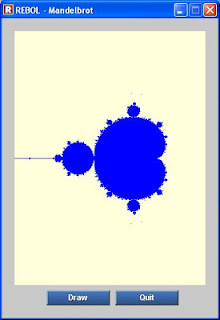
 REBOL [

        Title: "Mandelbrot"

        Date: 21-Sep-2001

        Version: 0.0.1

        File: %mandelbrot.r

        Author: "Keith Ray"

        Purpose: "Create Mandelbrot Set "

        Email: %keithray--yahoo--com

]

clear-im: func [im [image!] color [tuple!]][

        repeat j im/size/x * im/size/y [poke im j color]

]

set-pixel: func [

        im [image!]

        x [integer!]

        y [integer!]

        color [tuple!]

        /local    x-siz y-siz siz

][

        x-siz: im/size/x

        y-siz: im/size/y

        poke im (y-siz - y * x-siz + x) color

]

calc-pixel: func [xPixel yPixel] [

        rmax: 2

        itmax: 100

        xStart: 0.00

        yStart: 0.00

        count: 0

        r: 0.00

        xnew: 0.00

        ynew: 0.00

        xold: 0.00

        yold: 0.00

        ;convert to real coordinates

        ;convert it to a value between -2.0 ... 1.0

        xStart: ( xPixel / 100.0 ) - 2.0

        ;convert it to a value between -2.0 ... 2.0

        yStart: ( yPixel / 100.0 ) - 2.0

        xold: xStart

        yold: yStart

        count: 0

        r:    0.0

        flag: 2

        while [flag > 1 ][

                flag: 0

                if ( r <= rmax )[flag: flag + 1 ]

                if ( count < itmax ) [flag: flag + 1 ]

                xnew: (xold * xold) - (yold * yold) + xStart

                ynew:    (2.0 * xold * yold) + yStart

                r: square-root ((xnew * xnew) + (ynew * ynew))

                xold: xnew

                yold:    ynew

                count: count + 1

        ]

        bol: false

        if (r < rmax)[bol: true]

        return bol

]

x-siz: 300 y-siz: 400

im: make image! 300x400

bg-color: 255.255.220

clear-im im bg-color

view layout [

        img: image im

        across

        pad 50

        button "Draw" [

        clear-im im bg-color

                repeat x x-siz [

                        repeat y y-siz [

                        if calc-pixel x y    [ set-pixel im x y blue ]

                        ]

                show img

                ]

             show img

        ]

        button "Quit" [quit]

]

 REBOL [

        Title: "Mandelbrot II"

        Date: 23-Sep-2001

        Version: 0.0.1

        File: %mandelbrot2.r

        Author: "Keith Ray"

        Purpose: "Create Mandelbrot Set with colors "

        Email: %keithray--yahoo--com

]

start-x: 2.0

start-y: 1.5

global-color: 0

clear-im: func [im [image!] color [tuple!]][

        repeat j im/size/x * im/size/y [poke im j color]

]

set-color: func [c ][

        switch c [

                1 [z: 0.0.0]

                2 [z: 20.0.0]

                3 [z: 40.0.0]

                4 [z: 60.0.0]

                5 [z: 80.0.0]

                6 [z: 100.0.0]

                7 [z: 120.0.0]

                8 [z: 140.0.0]

                9 [z: 160.0.0]

                10 [z: 180.0.0]

                12 [z: 180.20.0]

                22 [z: 180.40.0]

                13 [z: 180.60.0]

                14 [z: 180.80.0]

                15 [z: 180.100.0]

                16 [z: 180.120.0]

                17 [z: 180.140.0]

                18 [z: 180.160.0]

                19 [z: 180.180.0]

                20 [z: 160.180.0]

                21 [z: 140.180.0]

                22 [z: 120.180.0]

                23 [z: 100.180.0]

                24 [z: 80.180.0]

                25 [z: 60.180.0]

                26 [z: 40.180.0]

        ]

return z

]

set-outside-pixel: func [

        im [image!]

        x [integer!]

        y [integer!]

        colr [integer!]

        /local    x-siz y-siz siz

][

        x-siz: im/size/x

        y-siz: im/size/y

        color: set-color global-color

        poke im (y-siz - y * x-siz + x) color


]

set-pixel: func [

        im [image!]

        x [integer!]

        y [integer!]

        color [tuple!]

        /local    x-siz y-siz siz

][

        x-siz: im/size/x

        y-siz: im/size/y

        poke im (y-siz - y * x-siz + x) color

]

calc-pixel: func [xPixel yPixel] [

        rmax: 2

        itmax: 26

        xStart: 0.00

        yStart: 0.00

        count: 0

        r: 0.00

        xnew: 0.00

        ynew: 0.00

        xold: 0.00

        yold: 0.00

        ;convert to real coordinates

        ;convert it to a value between -2.0 ... 1.0

        xStart: ( xPixel / 100.0 ) - start-x

        ;convert it to a value between -2.0 ... 2.0

        yStart: ( yPixel / 100.0 ) - start-y

        xold: xStart

        yold: yStart

        count: 0

        r:    0.0

        flag: 2

        while [flag > 1 ][

                flag: 0

                if ( r <= rmax )[flag: flag + 1 ]

                if ( count < itmax ) [flag: flag + 1 ]

                xnew: (xold * xold) - (yold * yold) + xStart

                ynew:    (2.0 * xold * yold) + yStart

                r: square-root ((xnew * xnew) + (ynew * ynew))

                xold: xnew

                yold:    ynew

                count: count + 1

        ]

        bol: false

        if (r > rmax)[global-color: to-integer r]

        if (r < rmax)[bol: true]

        return bol

]

x-siz: 300 y-siz: 300

im: make image! 300x300

bg-color: 255.255.220

clear-im im bg-color

view layout [

        img: image im

        across

        pad 50

        button "Draw" [

        clear-im im bg-color

                repeat x x-siz [

                        repeat y y-siz [

                        either calc-pixel x y    [ set-pixel im x y black ][set-outside-pixel im x y y]

                        ]

                show img

                ]

             show img

        ]

        button "Quit" [quit]

]



